Who Owns a Website When WHOIS Is Private?
In short: When WHOIS is private, you can still find out who is behind a website. First, run an RDAP lookup (the successor to WHOIS) at ICANN Lookup for the registration dates and registrar. Then follow the site's other traces: its legal pages, archived versions, tracking codes and security certificates, which often link it to an owner or to other sites.
Also known as: WHOIS lookup; domain owner lookup; RDAP lookup; website ownership check.
Key facts
A WHOIS or RDAP lookup shows a domain's registration and expiry dates, its registrar and status, and the owner only if the owner has not hidden it.
RDAP (Registration Data Access Protocol) replaced WHOIS for generic top-level domains: since 28 January 2025, ICANN no longer requires registries and registrars to offer WHOIS, except for .com, .name and .post.
Most personal data in domain records is now redacted under data-protection rules such as the GDPR, so a hidden owner is normal and not proof of fraud.
Tracking codes such as Google Analytics or Yandex Metrica IDs can link websites run by the same person, because the owner has to add the same account code to each site.
Two websites on the same server are often unrelated: shared hosting puts thousands of sites on one address.
Debunk.org analysis of a fake "Interpol compensation" site, January–February 2025: the domain was registered for one year on 7 January 2025, ads pointing to it began on 13 January, and 278 ads used it in five weeks.

Step 1: Read the site itself
The first place to look for a website's owner is the site itself: its imprint, contact page, terms, and privacy policy.
A legitimate business usually lists its company name, registration number, and address. Check that company in its country's official business register. Scam and propaganda sites often lack company details, use generic "About us" text, or copy details from another business. Also check payment and checkout pages: the company name shown by the payment provider may differ from the one on the homepage.
Step 2: Look up the domain (WHOIS / RDAP)
A WHOIS/RDAP lookup shows a domain's creation date, expiry date, registrar, status, and registrant (if the data is public).
Enter the domain in ICANN Lookup, a free tool run by ICANN, the body that coordinates domain names. It returns:
the creation date: a domain created days before an ad campaign is a warning sign;
the expiry date: a one-year registration is cheap and disposable;
the registrar: the company the domain was bought through;
the registrant: often shown as "REDACTED" or as a privacy service.
Why is the owner hidden? Since the EU's General Data Protection Regulation (GDPR) took effect in May 2018, registrars have redacted most personal data from public records under ICANN's rules, and many owners also pay for privacy services. People with a legitimate reason, such as law enforcement or rights holders, can ask the registrar for the hidden data; ICANN launched a free Registration Data Request Service for such requests in November 2023.
Get new investigations by email. debunk.org/subscribe
What replaced WHOIS? RDAP explained
RDAP (Registration Data Access Protocol) replaced WHOIS as the official source of domain registration data for generic domains in January 2025.
ICANN describes RDAP as delivering "WHOIS-like registration data, but in standardised data access and query response formats", with "support for internationalisation, secure access to data" among its other benefits. In practice, that means structured answers that software can read, and queries over a secure connection.
ICANN calls RDAP, the Registration Data Access Protocol, "the replacement for the WHOIS protocol". Since 28 January 2025, registries and registrars of generic domains (.org, .info, .site and others) are no longer required to provide WHOIS, except for .com, .name and .post. Country domains such as .lt, .ru or .de follow their own registry's rules, and some withhold even the creation date.
How to find who owns a website when WHOIS is private
When the lookup shows "REDACTED" or a privacy service, move from the registration record to the site's own traces: steps 3 to 7 below.
You can still contact a hidden owner: ICANN's Registration Data Policy, in force since 21 August 2025, requires registrars to "publish an email address or a link to a web form to facilitate email communication with the relevant contact". ICANN noted in May 2026 that some registrars' forms only notify the owner that someone is trying to reach them. A hidden registrant is normal and is not proof of fraud. Archived pages may still show an old owner or company; tracking codes and certificates can tie the site to other sites; and ads point to the pages that paid for them.
Step 3: Check the archives
Archived copies of a website show what it looked like before, who it named as its owner then, and when it changed.
The Wayback Machine keeps copies of billions of web pages. Enter the address and pick a date. Look for:
an earlier imprint or contact page that named a company or a person;
a change of topic: a domain that sold furniture last year and "investment software" today has changed hands or purpose;
the first archived date, a rough check on how old the site really is.
Archived pages also keep old tracking codes that have since been removed from the live site (step 4).
Step 4: Check the trackers
Tracking codes link websites to the same owner, because each code belongs to one analytics or advertising account.
Website owners add codes from services such as Google Analytics, Google Tag Manager, Yandex Metrica, the Meta Pixel or Google AdSense to measure visitors or earn money from ads. Each code carries an account number. If two sites carry the same account number, someone with access to that account added it to both: a strong sign of a common owner.
How to check:
Open the page source (right-click → "View page source") and search for UA-, G-, GTM-, pub-, ym( or fbq(.
Search for the same code on other sites with a reverse-lookup service, or in archived copies of the site.
Older Google Analytics codes (UA-1234567-1, UA-1234567-2) share an account root: the middle number. Two codes with the same middle number come from one account.
Google stopped processing data for old "UA" properties on 1 July 2023, but archived copies of websites still contain the codes. Bellingcat, the investigative group, publishes a free tool for "scraping current and historic Google Analytics data" from Wayback Machine snapshots.
Step 5: Check the security certificates
Certificate logs list every security (HTTPS) certificate issued for a domain, and sometimes the other domains on the same certificate.
Search the domain on crt.sh, a free search of public Certificate Transparency logs. Each certificate shows the issue date and the names it covers. A single certificate covering several unrelated brand names strongly suggests they are run together. New certificates also show when a site was being set up, sometimes before it went live.
Step 6: Check the hosting and linked domains
Hosting data shows where a site lives; it only points to a common owner when few other sites share the same server.
Look up the site's IP address and hosting provider. Then look for other domains with:
the same server, if that server hosts only a handful of sites;
the same registrar and registration date, sometimes within minutes or seconds: in Debunk.org's WeRedirect investigation, some scam domains "were created within a very similar time frame (sometimes within a few seconds)";
the same name pattern, page template or website theme.
If a site sits behind a content-delivery network such as Cloudflare, you see the network's address, not the real host.
Step 7: Check ads and social media pages
If you reached a website through an ad, the advertiser's page is another lead to its owner.
Open the advertiser in the Meta Ad Library. The page's transparency section shows when the page was created, whether it changed its name, and the countries its administrators are based in. In one Debunk.org study of scam ads, most pages had administrators based in Lithuania and/or the United States.
How to unmask a domain owner
To unmask a domain owner, look for clues that only the owner could have created and that also appear on sites whose owner is known.
The most useful are: the same analytics or advertising account code on another site (step 4), one security certificate that covers several domains (step 5), an owner or company named on an archived version of the site (step 3), and, for professionals, registrant details in older registration records from before data was redacted. Law enforcement and rights holders can also request the hidden data through ICANN's request service.
Which clues prove a link, and which don't
Investigators separate strong clues, which the owner must create deliberately, from weak ones that thousands of unrelated sites share.
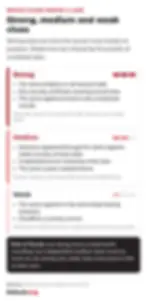
Rule of thumb: one strong clue is a lead worth recording; two independent medium clues count as much as one strong one; weak clues never prove a link on their own. Debunk.org applies the same logic when it attributes influence operations; see attribution and confidence levels.
Worked example: a fake "Interpol compensation" site
Debunk.org traced a deepfake scam-ad site in 2025 without ever learning the owner's name, because the pattern was enough.
In early 2025, Debunk.org analysts found deepfake video ads on Facebook in which an AI-generated TV reporter urged "scam victims" to claim compensation from Interpol. The ads led to joversv[.]site.
The site: no company details and no emergency contacts.
Registration: created on 7 January 2025, set to expire on 7 January 2026: a one-year, disposable domain. Ads pointing to it began on 13 January.
Hosting: a private hosting service; the same IP addresses hosted over 700 websites and had previously been associated with phishing.
Ads: 278 ads used the domain between 13 January and 19 February 2025, most staying up only a few hours.
Result: The owner stayed hidden, but the fresh one-year registration, phishing-linked hosting and short-lived ads were enough to identify a fraud site and report it. The ads were removed.
For the bigger picture of who is behind influence operations, see what FIMI is.
Want to investigate websites and networks like this? FIMI 101 teaches the open-source checks analysts use, with real cases. → Start FIMI 101
Is WHOIS legal to use?
Yes: looking up WHOIS or RDAP records is legal and intended; they are public services, but any hidden personal data stays protected.
Registries set conditions on how you use the data. The .nl registry SIDN, for example, says that "if you use Whois information for marketing, that's abuse" and lists "using an automated system to look up information in the Whois" among the forbidden uses. WHOIS/RDAP records, Certificate Transparency logs and the Wayback Machine are public services. You may not break into accounts, pose as someone else to obtain data, or misuse personal data you find. You can request hidden registrant data from the registrar only with a legitimate reason.
FAQ
How can I find out who owns a domain name for free? Use ICANN Lookup or another WHOIS/RDAP tool. It is free and shows the registrar and dates; the owner appears only if not redacted.
How do I unmask a hidden domain owner? You usually can't see the name directly. Instead, look for the owner's other traces: the site's legal pages, archived versions, shared tracking codes and certificates (steps 1, 3, 4 and 5). Law enforcement and rights holders can request the data from the registrar.
Is a new domain always a scam? No. Every site was new once. A new domain is a warning sign when the site claims a long history or shows other red flags.
Can two sites on the same IP address have the same owner? Sometimes, but shared hosting puts thousands of unrelated sites on one address. Treat it as a weak clue unless only a few sites share the server.